

Nintendo’s next gaming console, the Wii U, recently released and I was one of the lucky ones to have one pre ordered to buy on day one. Certainly, adding a second screen to play on is a huge game changer as demonstrated in Nintendo Land and ZombiU, but the second biggest game changer is a brand new social network that hasn’t received much buzz just yet.
Every Wii U user gets access to a social network called Miiverse. Before logging into Miiverse for the first time, I had little idea what it was or how it could be used within games. Even Nintendo has had a tough time explaining it. A fun video they created this past June attempted to explain it, but only explained part of what it can do.
What is it?
Miiverse basically is the combination of an online forum and the best features of social networks such as Facebook and Twitter. Using the power of bullet points, I am going to attempt to explain what Miiverse is. If you have had experience with Miiverse, feel free to skip past the bullet points and onto my overall thoughts.
- Miiverse is an application that is accessible from the Wii U home menu.
- Although Miiverse is displayed on your TV, it is controlled entirely by the Wii U GamePad. Miiverse can be used while your TV is turned off.
- Players within Miiverse go by the names of their Mii rather than their Nintendo Network ID which is listed in your Mii’s profile. A player’s avatar is always their Mii.
- Within Miiverse, games and apps are broken up into threads or Communities as they are called. Every Wii U game and application has its own Community.
- Within a Community, players can post anything about the game or app such as posting their thoughts or asking a question.
- Players can post text with a limit of 100 characters or draw pictures
- In game screenshots can be posted to Miiverse, accompanying text or a drawing. Taking a screenshot is as simple as pressing the Home button on the point in your game where you want to take a screenshot. From there, you go into Miiverse and select that you want to post. From there, you can add a screenshot. The screenshot can be from either the TV screen or the GamePad’s screen. You get the option to choose.
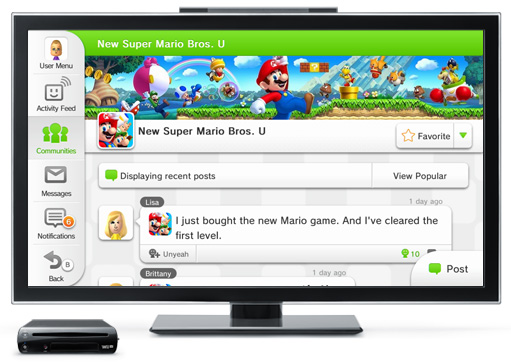
- Each community displays the most recent posts about the game as seen in the screenshot above. Like the activity feed in Facebook, you can continually scroll down to see more posts.
- You can “Yeah” a post which works exactly like a “like” in Facebook. You can also comment on any post.
- An icon will display below each post to let you know if the person posting within a community has the game of the community. For example, when I post in the Assassin’s Creed III community, an icon that looks like a cube with a check mark is displayed under all my posts, proving to users that I have the game. If I didn’t have Assassin’s Creed III, I could still post in the community, but people will be aware that I do not own the game, so I couldn’t lie about it.
- You can tell Miiverse that your post contains spoilers. When displayed in the community, it is up to the player to decide whether or not to reveal the contents of the post.
- Via a notifications tab, you are notified any time a player comments on one of your posts or any time another player comments on a post that you left a comment on.
- A player’s Activity Feed displays your posts alongside posts from the friends on your friends list and people you follow.
- You can follow players on Miiverse without having to send them a friend request. Following them means that all of their Miiverse posts will be displayed in your activity feed.
- You can also send Nintendo Network friend requests and private messages to Miiverse users.
- Miiverse can be used while games are in suspension. This means that you can check Miiverse without ever having to quit out of a game.
- Games can natively integrate Miiverse. The only games to my knowledge that do this are Nintendo Land and New Super Mario Bros. U.
- When turning on the Wii U, the first thing players will see is the WaraWara Plaza, a place where random posts from Miiverse users are displayed about the most popular games and applications.
- In 2013, Miiverse will become accessible from PCs, smartphones, and Nintendo 3DS.
How Does it Change Things?
If someone were to tell me before I got my Wii U that the most used application on it would be Miiverse, I wouldn’t have believed it. I now find myself checking Miiverse several times per day for entertaining posts that might catch my eye.
The smartest thing about Miiverse is that it is built into the console and focuses specifically on the games. The fact that each game is separated into its own Community ensures that posts are presented in an organized fashion.
For the games that I already own, I tend to post screenshots of funny moments within games. I also check on the Communities to see what people are saying about them. The Communities are full of active users.
One post I made about Assassin’s Creed III got six “yeahs” and people even commented on them. If you have a Wii U and want to see my posts, you can look up my Nintendo Network ID: sheardude.
Whenever I’ve been interested in purchasing a game such as Scribblenauts Unlimited or wanted to find out how gamers were liking oddities such as Funky Barn or Tank Tank Tank!, I would just go over the the Miiverse Community and look at some posts.


![[Opinion] Nintendo's Switch plans are disrespectful to consumers](https://i0.wp.com/levelsave.com/wp-content/uploads/2017/01/20-nintendo-switch.jpg?resize=145%2C100&ssl=1)


You must be logged in to post a comment.